
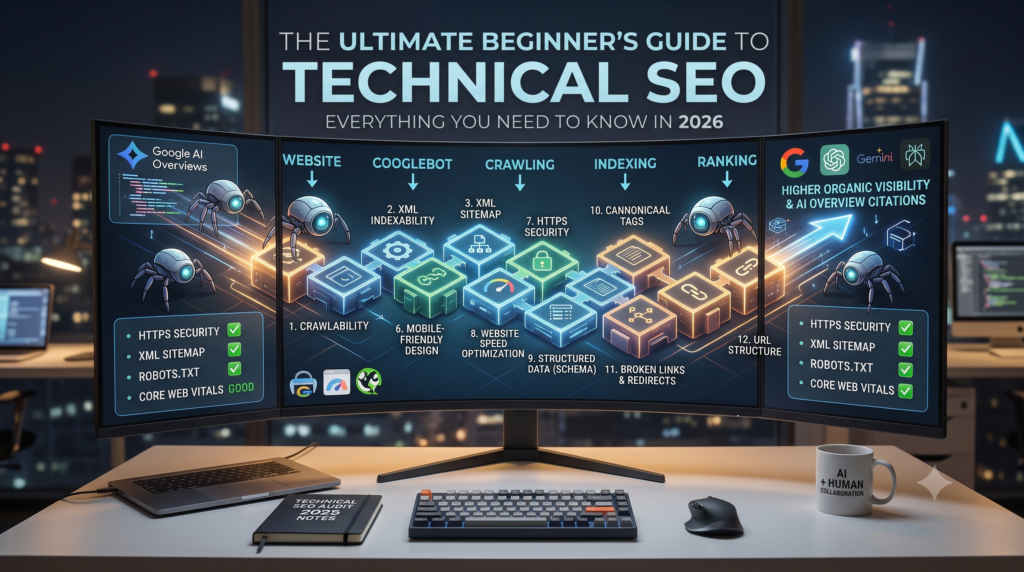
Technical SEO is the foundation of every successful website. You can publish excellent content and build high-quality backlinks, but if search engines struggle to crawl, understand, or index your website, your pages may never reach their full ranking potential. As Google Search evolves alongside AI-powered platforms like Google AI Overviews, ChatGPT, Gemini, and Perplexity, technical SEO guide has become more important than ever.
Imagine spending months building a luxury hotel, complete with gourmet restaurants and beautiful suites, but completely forgetting to pave a road that leads to it. No one will ever find it. That is exactly what happens when many beginners overlook technical SEO. They pour their hearts into writing content and designing beautiful graphics, only to be met with zero traffic because Google’s bots hit a digital brick wall when trying to access their site.
In the 2026 landscape, a technically sound website isn’t just required for traditional SEO; it is the prerequisite for participating in the AI search revolution. If an AI crawler cannot efficiently parse your site’s architecture, your brand will never be cited in an AI overview.
In this comprehensive Technical SEO Guide, you will learn exactly how search engines interact with your website, the 12 essential technical elements you need to master, and how to perform a technical SEO audit to future-proof your digital presence.
What Is Technical SEO?
To put it simply, technical SEO refers to the behind-the-scenes website optimizations that help search engines crawl, interpret, and index your pages effectively. It has nothing to do with the actual words you write on a blog post or the links you earn from other websites. Instead, it deals with your site’s infrastructure—things like page speed, mobile-friendliness, site architecture, and security.
Many beginners confuse the different pillars of search engine optimization, so let’s draw a clear line:
- On-Page SEO is about optimizing your content for users and relevance (keywords, headings).
- Off-Page SEO is about building authority and trust (backlinks, digital PR).
- Technical SEO is about building a functional, accessible foundation for search engine bots.
Quick Answer Box:
Technical SEO is the process of optimizing a website’s technical elements so search engines can efficiently crawl, index, and understand its content, improving visibility and user experience.
Why Technical SEO Matters More Than Ever in the AI Era
In the early days of SEO, you could sometimes get away with a slow, clunky website if your keyword targeting was strong enough. Those days are gone.
With the rollout of Google AI Overviews and the dominance of AI-powered search engines, user experience and machine readability are paramount. AI models require highly structured, fast-loading, and easily accessible data to synthesize their answers. If your website is bogged down by broken links, confusing architecture, or terrible mobile accessibility, AI crawlers will skip you in favor of a competitor whose site is easier to process.
Furthermore, Google uses mobile-first indexing, meaning it exclusively judges your site based on how it performs on a smartphone. Faster websites with better accessibility don’t just rank higher; they retain users, lower bounce rates, and provide the exact frictionless experience that modern algorithms reward.
👉 Read more: SEO Is Not Dead: Why It Matters More Than Ever in the AI Era
How Search Engines Crawl, Index, and Rank Your Website
Before you can fix technical SEO issues, you need to understand the journey a search engine takes when it discovers your website. Think of Google as a massive digital librarian.
What Is Crawling?
Crawling is the discovery phase. Google sends out specialized bots (called Googlebot or “spiders”) to explore the web. These bots follow links from one page to another, discovering new content. If your site blocks these bots or lacks internal links, the crawler hits a dead end.
What Is Indexing?
Once the bot crawls your page, it tries to understand what the page is about. It analyzes the text, images, and video, and stores this information in the Google Index (a massive database). If your page isn’t in the index, it absolutely cannot appear in search results.
How Ranking Works
When a user types a query into Google, the search engine scours its index for the most relevant, highly authoritative answers. It applies thousands of ranking signals (like speed, keywords, and backlinks) to order the results from most to least useful.
The flow looks like this:
Website ↓
Googlebot ↓
Crawling ↓
Indexing ↓
Ranking
Technical SEO vs On-Page SEO vs Off-Page SEO
To build a holistic SEO strategy, you must understand how these three pillars work together. Here is a quick breakdown:
| Technical SEO | On-Page SEO | Off-Page SEO |
| Site speed | Content | Backlinks |
| XML Sitemap | Keywords | Brand mentions |
| Robots.txt | Meta tags | PR |
| Schema (Structured Data) | Internal links | Authority |
These pillars are not independent; they are deeply connected. You can have incredible Off-Page Authority and perfect On-Page Keywords, but if your Technical SEO prevents the site from being indexed, the other two pillars are useless.
Technical SEO Guide : 12 Essential Technical SEO Elements Every Beginner Should Know
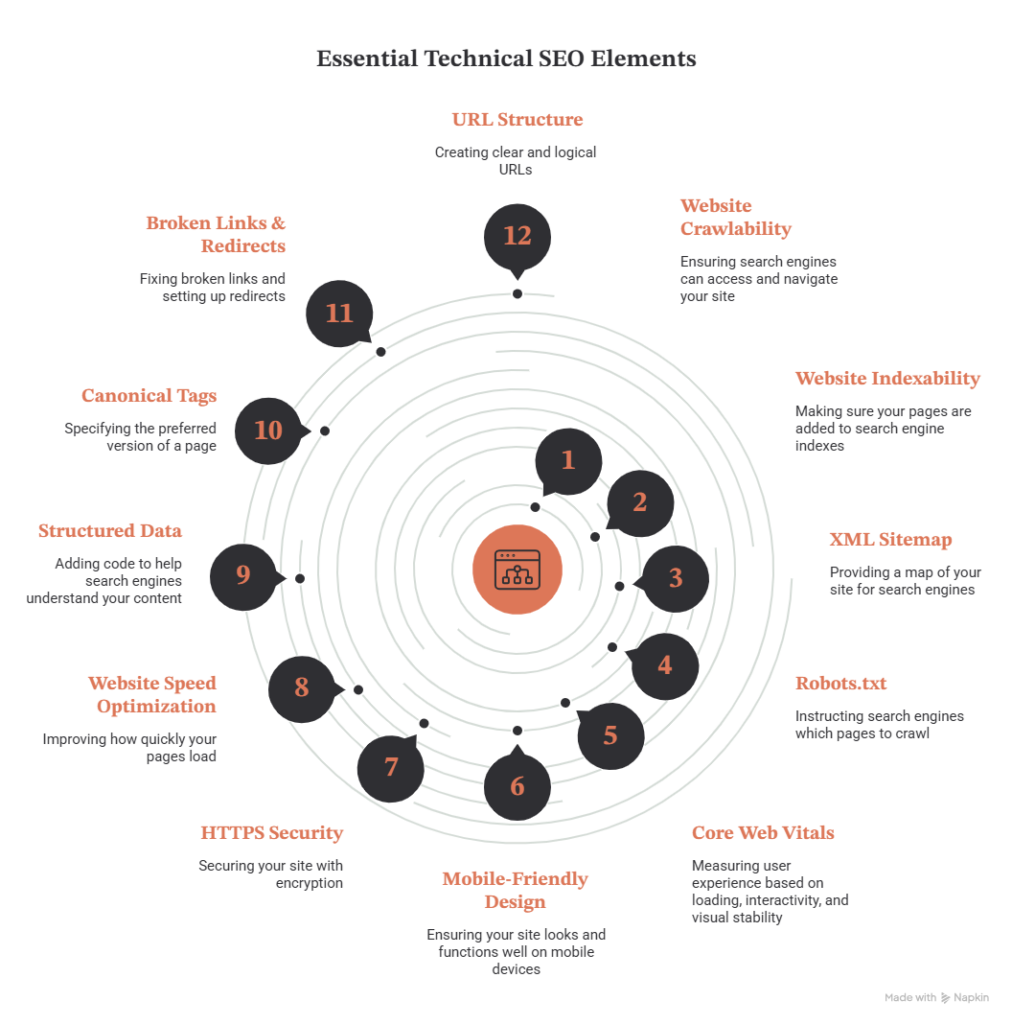
Ready to get your hands dirty? Here is the ultimate beginner’s technical SEO checklist of the 12 elements you need to understand in 2026.
1. Website Crawlability
Your website must be easy for Googlebot to navigate. This is primarily driven by your internal linking structure. If a page on your site has no links pointing to it (an “orphan page”), Googlebot will struggle to find it. Furthermore, large websites need to manage their crawl budget—the limited amount of time and resources Google will spend crawling your site. Clean navigation ensures Google wastes no time on unimportant pages.
2. Website Indexability
Just because a page is crawled doesn’t mean it gets indexed. You can use a noindex tag in your site’s code to intentionally tell Google not to index specific pages (like a “Thank You” page after a form submission). However, a common beginner mistake is accidentally leaving a noindex tag on a crucial blog post, rendering it invisible to search engines.
3. XML Sitemap
An XML sitemap is essentially a roadmap of your website specifically designed for search engines. It lists all your important URLs, helping Google discover new pages faster.
- Why it’s important: It ensures Google doesn’t miss any critical content.
- How to use it: You must generate an XML sitemap (most SEO plugins do this automatically) and submit it directly to Google Search Console.
4. Robots.txt
The robots.txt file is the bouncer at the door of your website. It is a simple text file that tells search engine bots which pages they are allowed to crawl and which ones they should ignore (like admin login pages or internal search results).
- Common Mistake: Accidentally blocking the entire website with a single slash (
Disallow: /). Always double-check your robots.txt file!
5. Core Web Vitals
Core Web Vitals are Google’s official metrics for measuring user experience based on speed, responsiveness, and visual stability.
- LCP (Largest Contentful Paint): Measures loading speed. The main content should load in under 2.5 seconds.
- INP (Interaction to Next Paint): Measures responsiveness. How fast does the page react when a user clicks a button or opens a menu?
- CLS (Cumulative Layout Shift): Measures visual stability. Does the text jump around while the page loads? (Keep this close to zero).
6. Mobile-Friendly Design
We live in a mobile-first world, and Google uses mobile-first indexing. This means Google completely ignores the desktop version of your site when evaluating your SEO. You must use responsive layouts that adapt perfectly to any screen size, ensuring buttons are easy to tap and text is readable without zooming.
7. HTTPS Security
Security is a confirmed ranking signal. If your website URL starts with http:// instead of https://, Google will mark your site as “Not Secure,” which scares away users and tanks your rankings. Installing an SSL certificate encrypts the data between your user and your server, establishing essential trust.
8. Website Speed Optimization
A slow website is a conversion killer. To optimize your speed, you must implement image compression (convert heavy JPEGs to modern WebP formats), enable browser caching, use lazy loading (so images only load when the user scrolls to them), and route your traffic through a CDN (Content Delivery Network) to serve your site from servers closest to your user’s physical location.
9. Structured Data (Schema Markup)
Schema markup is a form of code that translates your content into a language AI and search engines understand perfectly. For example:
- Article Schema tells Google, “This is a news article written by Jayasri.”
- FAQ Schema tells Google, “Here is a list of questions and direct answers.”
- Organization Schema provides your company’s official details.In the 2026 AI search landscape, Schema is the key to unlocking rich results and AI Overview citations.
10. Canonical Tags
If you have multiple URLs with identical or highly similar content (like a product available in two different colors, each with its own URL), Google gets confused about which one to rank. A canonical tag (rel="canonical") tells Google, “This is the master version of this page; please rank this one and ignore the duplicates.”
11. Broken Links & Redirects
Clicking a link and hitting a “404 Not Found” page is a terrible user experience, and search engines hate it. You must regularly audit your site for broken internal links. If you delete a page or change its URL, you must set up a 301 Redirect to permanently send users and bots to the new, correct URL. Beware of “redirect chains” (Page A redirects to Page B, which redirects to Page C), as these slow down crawlers.
12. URL Structure
Keep your URLs short, clean, and descriptive.
- Bad:
www.jayasriremma.com/p=12345?category=blue - Good:
www.jayasriremma.com/technical-seo-guideInclude your primary keyword in the URL and use hyphens to separate words. Clean URLs are easier for users to read and easier for search engines to categorize.
Technical SEO Checklist for Beginners
Use this quick checklist to ensure your website’s technical foundation is solid:
| Task | Status |
| HTTPS Security is active | ✅ |
| XML Sitemap submitted to Search Console | ✅ |
| Robots.txt file is optimized | ✅ |
| Site passes Mobile-Friendly tests | ✅ |
| Core Web Vitals (LCP, INP, CLS) are in the “Good” range | ✅ |
| Broken links (404s) have been redirected via 301s | ✅ |
| Structured Data (Schema) is implemented | ✅ |
Best Free Technical SEO Tools
You don’t need to spend thousands of dollars to perform a technical SEO audit. Here are the best free (or freemium) tools every beginner should use:
- Google Search Console: The absolute most important tool. It tells you exactly how Google sees your site, lists indexing errors, and monitors Core Web Vitals.
- Google PageSpeed Insights: Analyzes your site’s speed and provides specific recommendations to improve LCP and INP.
- Google Lighthouse: A built-in Chrome extension that runs an instant audit on performance, accessibility, and SEO.
- Screaming Frog SEO Spider: A desktop program that crawls your site like Googlebot, highlighting broken links, missing meta tags, and redirect issues (free up to 500 URLs).
- Bing Webmaster Tools: Often overlooked, Bing provides an excellent, free site audit tool with detailed technical insights.
- Ahrefs Webmaster Tools (AWT): Connect your site for free to run a comprehensive, enterprise-level technical audit.
- Semrush Site Audit: Offers a free tier to crawl your site and assigns you a “Technical Health Score.”
Common Technical SEO Mistakes Beginners Make
Even experienced marketers occasionally stumble over technical issues. Here are the most common pitfalls to avoid:
- Blocking important pages in robots.txt: A single typo can de-index your entire site.
- Forgetting XML sitemaps: Launching a new site without submitting a sitemap dramatically slows down the discovery process.
- Slow websites: Uploading uncompressed, 5MB images that destroy page speed.
- Broken internal links: Changing URL slugs without setting up 301 redirects, leaving users stranded.
- Duplicate content: Failing to use canonical tags on e-commerce product variants.
- Missing canonicals: Every page should have a self-referencing canonical tag to prevent scraper sites from stealing your SEO value.
- Ignoring mobile performance: Designing a beautiful desktop site but leaving the mobile version clunky and unreadable.
How Technical SEO Supports SEO, GEO, and AEO
If you’ve been following modern digital marketing trends, you know that optimizing for generative AI is the new frontier. But here is the secret: you cannot succeed in AI search without technical SEO.
AI models are data-hungry. They rely on clean, accessible, and structured architecture to pull answers. The flow of visibility looks like this:
Technical SEO ↓
Better Crawling ↓
Better Indexing ↓
Better AI Understanding ↓
Higher Visibility (Search & AI)
When your technical SEO is flawless, your content is easily digested by Answer Engines.
👉 Explore further:
- GEO vs AEO: The Complete Guide to Optimizing Your Website for AI Search
- Google AI Overviews Explained
- SEO Is Not Dead
Frequently Asked Questions About Technical SEO
What is technical SEO?
It is the process of optimizing the backend structure of a website (speed, mobile-friendliness, indexability) to help search engines crawl and understand it efficiently.
Is technical SEO difficult?
While it sounds intimidating, most basic technical SEO (like submitting sitemaps, fixing broken links, and using SEO plugins) is entirely achievable for beginners without knowing how to code.
Why is technical SEO important?
If search engines cannot crawl or index your site, your content will never appear in search results, no matter how good it is.
What is crawlability?
It refers to a search engine bot’s ability to navigate through your website by following internal links and reading your site architecture.
What is indexability?
It refers to a search engine’s ability to analyze a crawled page and add it to its database (the index) so it can be shown in search results.
What tools are used for technical SEO?
Google Search Console, Screaming Frog, Ahrefs Webmaster Tools, and Google PageSpeed Insights are industry standards.
How often should I audit technical SEO?
For small sites, a deep audit every quarter is sufficient. For large, frequently updated e-commerce sites, you should run automated technical audits weekly.
Final Thoughts: Technical SEO Is the Foundation of Digital Success
Technical SEO is not just about fixing website errors—it’s about creating a fast, secure, and accessible website that search engines and users can trust. As search continues to evolve with AI-powered experiences, businesses that invest in strong technical foundations will be better positioned to achieve long-term organic visibility.
Whether you’re a beginner learning SEO or a business owner looking to improve your website, mastering technical SEO is one of the most valuable investments you can make. By combining technical excellence with high-quality content, user-focused optimization, and AI-aware strategies, you can build a website that performs well today and is ready for the future of search.
Strengthen your digital marketing knowledge by exploring our related blog guides:
- SEO Is Not Dead: Why It Matters More Than Ever in the AI Era
- GEO vs AEO: The Complete Guide to Optimizing Your Website for AI Search
- Google AI Overviews Explained
- How ChatGPT Is Changing Digital Marketing in 2026
- 10 AI Marketing Tools Every Digital Marketer Should Use
- Content Marketing in 2026: 12 Proven Strategies That Actually Work
About the Author
Jayasri Remma is a Digital Marketing Professional specializing in SEO, Technical SEO, AI Search Optimization (GEO), Answer Engine Optimization (AEO), and content strategy. Through Reach by JR, she shares practical guides, industry insights, and AI-driven marketing strategies to help businesses improve their online visibility while exploring the future of search.